
Your Firestick remote is in your hand, your screen is staring back at you, and you're wondering whether it's finally time to ditch the cable bill for good. You've heard about IPTV. Your neighbour swears by it. Your colleague at work uses it. But every time you search online, you hit a wall of confusing jargon, sketchy-looking websites, and reviews that feel like they were written by robots.
So let's do this differently. This is a real breakdown — no fluff, no hidden agenda — of what free IPTV apps for Firestick actually deliver in 2026, what paid ones genuinely offer, and how to figure out which one deserves a spot in your entertainment setup. By the end, you won't just know the difference. You'll know exactly what to do next.
What Is IPTV and Why Does Everyone Keep Talking About It?
IPTV — Internet Protocol Television — is simply the delivery of TV content through your internet connection rather than a cable line or satellite dish. Your Amazon Firestick, plugged into your TV's HDMI port, becomes a full-blown smart TV that can access hundreds or even thousands of channels from around the world.
No dish on your roof. No cable box from a telecom company. No annual contract.
The reason Firestick became the favourite device for IPTV users is straightforward: it's cheap, it's portable, it runs apps smoothly, and Amazon has made sideloading third-party apps relatively accessible. Plug it in, connect to Wi-Fi, and you have a device that punches well above its price tag.
Within IPTV, there are two very different worlds — free apps and paid services. And the gap between them is wider than most people realise.
Free IPTV Apps on Firestick: The Real Picture
People assume "free" means compromised. In some cases that's true, but some of the most reliable free IPTV apps for Firestick in 2026 cost absolutely nothing and have every right to be on your home screen.
Pluto TV — The Easiest Starting Point
Imagine flipping through traditional TV channels — news, sport, movies, comedy, reality shows — except you're doing it on your Firestick with zero subscription fees and zero sign-ups required. That's Pluto TV.
It runs on an ad-supported IPTV model, which means you'll sit through commercials the way you used to with broadcast television. Over 250 live streaming channels are available, covering a wide range of genres, and the service is completely legal with all content properly licensed. There's no free trial that converts into a surprise charge. You simply open the app and watch.
The limitation is honest: you won't find premium live sports, newly released films, or deep international programming here. Pluto TV is for the viewer who wants background entertainment, casual browsing, and variety without strings attached.
Plex TV — More Depth Than Most People Expect
Plex earns its place as one of the most impressive free streaming platforms available anywhere, let alone on Firestick. With over 600 live TV channels and thousands of on-demand movies and TV shows — all accessible on a free account — it covers far more ground than most people realise before they actually try it.
The interface feels genuinely premium. It loads fast, organises content intelligently, and doesn't feel like a compromise. The optional "Plex Pass" upgrade exists, but most users find the free tier covers everything they need without touching it.
If you have a personal media collection stored on a home computer or server, Plex streams it to your Firestick beautifully — making it simultaneously a live TV service and a personal media manager.
Tubi TV — The Underdog Worth Knowing
Tubi has grown considerably and deserves more attention than it typically gets. Like Pluto TV, it's completely free and ad-supported. Unlike Pluto TV, it leans much more heavily into on-demand content — a library of tens of thousands of movies and TV series that would honestly embarrass some paid streaming platforms.
Live channels are available too, though that's not where Tubi shines brightest. If your household watches a lot of movies and older TV series rather than live events, Tubi belongs on your Firestick.
Premium live sports (Champions League finals, IPL, UFC, Premier League) are almost never included. Regional and international channels are limited. New movie releases won't appear until well after their theatrical window. And geo-restrictions mean some content available in one country simply won't appear in another. For casual viewing, these limitations are fine. For households with specific sports loyalties or regional content needs — free apps will leave real gaps.
Paid IPTV Apps on Firestick: What the Money Actually Buys
Before spending a penny, you need to understand one distinction the internet does a poor job of explaining clearly. There are two separate things people call "paid IPTV":
IPTV Players are the apps installed on your Firestick — TiviMate, IPTV Smarters Pro, GSE Smart IPTV. These apps display and organise content. They don't supply the channels. Think of them as the TV set, not the cable service.
IPTV Service Providers are the subscriptions that supply the actual channels and content via an M3U playlist link or Xtream Codes. You bring this subscription to the player app, and the player makes it watchable.
Most people who've had a bad experience with paid IPTV confused one for the other. Getting this right makes the whole experience dramatically better.
TiviMate — The Player Most Enthusiasts Settle On
TiviMate has developed a strong reputation for good reason. The free version works, but the premium upgrade — priced at roughly $5 per year — transforms the experience. Multiple playlist support, a clean and fast electronic programme guide (EPG), recording capability, and a customisable panel layout all come with it.
For the cost of a single cup of coffee annually, TiviMate premium is genuinely exceptional value. Users who switch to it from other players consistently say they won't go back.
IPTV Smarters Pro — The Reliable Alternative
Not quite as polished as TiviMate but far from second-rate. IPTV Smarters Pro handles large channel libraries without stuttering, manages multiple simultaneous connections cleanly, and has a straightforward interface that doesn't require a learning curve. It costs a modest one-time fee and pairs smoothly with most reputable service providers.
For users who find TiviMate's feature set more than they need, Smarters Pro is a sensible, dependable choice.
FireLive TV — A Paid Service Worth Knowing About
If you've done any research into paid IPTV services in the USA, you've likely come across FireLive TV. It's one of the more straightforward services available right now — and for good reason.
FireLive TV offers 6,000+ live HD channels spanning local US networks, international content, news, entertainment, and live sports — all on fast, secure servers with EPG and catch-up TV built in. What makes it particularly accessible for first-timers is the 24-hour free IPTV trial, which lets you test the full service on your Firestick before committing to a plan.
Pricing is clear and tiered:
Bronze
$29.99
1 month
Silver
$69.99
3 months
Gold
$119.99
6 months (~$20/mo)
Platinum
$189.99
1 Year Service
Each plan includes parental controls, 24/7 customer support, and compatibility across multiple devices — meaning your Firestick, phone, tablet, and laptop can all run under a single paid subscription. For households looking to cut the cord completely without juggling multiple streaming apps, this kind of all-in-one service simplifies things considerably.
The free trial is particularly useful here — rather than reading about the channel quality, you can load it on your Firestick today and judge it yourself on your own connection and TV.
What a Quality Paid Subscription Delivers
A reliable paid subscription typically gives you:
- Tens of thousands of live international channels
- HD and 4K streaming on a fast enough connection
- A deep video-on-demand library spanning movies, series, and documentaries
- Live premium sports including events that would otherwise require expensive add-ons
- Catch-up TV for missed programmes
- EPG support for easy channel browsing
- Multiple device connections under one subscription
- Customer support when something goes wrong
For a household currently spending $80 to $150 monthly on a traditional cable package, a well-chosen IPTV subscription represents a substantial and immediate saving.
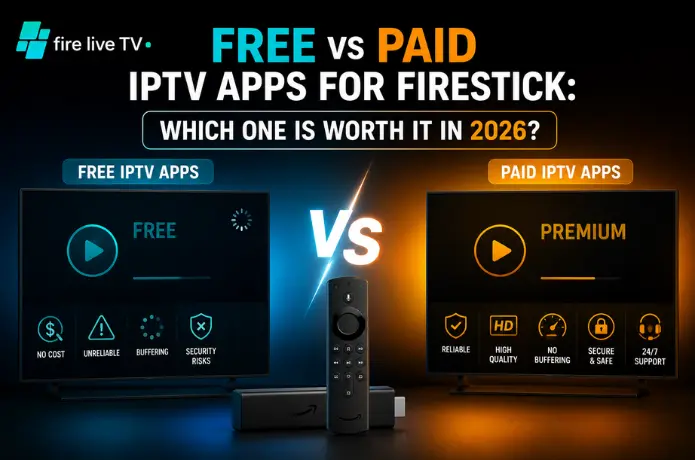
Free vs Paid: Side by Side
| Factor | Free Apps | Paid IPTV |
|---|---|---|
| Monthly cost | Zero | $10–$30/month |
| Live channels | 250–600 | 6,000–50,000+ |
| Premium live sports | Rarely | Yes |
| Stream quality | SD to HD | HD to 4K |
| International content | Very limited | Extensive |
| Advertisements | Yes | Generally no |
| Service reliability | Very stable | Varies by provider |
| Free trial | No | Yes (e.g. FireLive TV) |
| Setup complexity | Simple | Moderate |
So Which One Is Actually Worth It in 2026?
The answer isn't the same for every household. Here's how to think about it:
Free is the right choice if you watch casually — background TV, occasional movies, general news and entertainment. Plex and Pluto TV together are genuinely impressive at no cost, and millions of people have no reason to go beyond them.
Paid makes sense if your household follows specific sports leagues, watches regional or international IPTV channels, wants live event access, or is currently spending more than $40 a month on cable or streaming bundles. A quality IPTV subscription for Firestick typically recovers its cost within the first month.
Install Plex and Pluto TV today. Use them for two weeks. Keep a mental note of what you reached for but couldn't find. If that list is long, use it as your shopping criteria. Services like FireLive TV that offer a 24-hour free trial are ideal for that next step — you find out exactly what you're getting before spending a dollar.
Before You Set Anything Up — Read This First
Internet speed is not optional. HD streams need a consistent 10 Mbps minimum. 4K IPTV streaming wants 25 Mbps or better. If your home Wi-Fi is inconsistent, a wired ethernet adapter for your Firestick makes a bigger difference than most people expect.
Your Firestick model matters. Older generations struggle with high-bitrate 4K content. The Firestick 4K Max is the current benchmark for IPTV use. If you're investing in a paid subscription expecting premium quality streams, make sure your hardware can keep up.
Manage your storage. Firestick internal storage is limited. Multiple IPTV apps alongside other streaming services fill it up fast. Clearing cached app data regularly keeps performance from degrading over time.
The player is not the subscription. Download a quality IPTV player for Firestick first — TiviMate is the easy recommendation — and then pair it with a provider separately. Treating these as two distinct decisions leads to far better outcomes.
Final Word
IPTV on Firestick in 2026 is the most mature and accessible it has ever been. The free tier is genuinely good — better than most cable subscribers expect before they actually try it. The paid tier, approached with care and tested before committing, offers a real and permanent alternative to the traditional cable bill.
The difference is simple: free IPTV gives you a comfortable, capable television experience at zero cost. Paid IPTV gives you a full cable replacement with the depth, sports, and international content that free platforms can't match.
Start free. Assess honestly. And when you're ready to upgrade, take advantage of trial offers — services like FireLive TV exist precisely to let you test before you invest. The best streaming setup is the one you stop thinking about because it just works.